


If you're deciding where AI fits into your short-term-rental systems, a complimentary one-on-one diagnostic call gives you a place to discuss that work.
Hey,
If you keep correcting your AI coworker's messages or reports, test a different model on that same job before changing the whole workflow.
I picked Astra for the website. I picked Smart for both videos. For the credit analysis, I picked Ultra.
Those choices came from a blind comparison. I saw outputs labeled A, B and C, with the model identities hidden and the letters reassigned for each task.
I wanted capability and a good user experience. Price wasn't my first priority.
Then I saw the credits. Across the eight jobs, Astra used about 16.4% fewer than Ultra. That surprised me. Smart used fewer than either of them.
I loved doing this test.
If you're choosing a model for your AI coworker, you can borrow the method. Start with work you recognize and decide what you would use before revealing who made it.
• • •
What I chose across eight jobs
The comparison ran on October 4, 2026, inside Viktor. Each of three settings received the same task brief for each job, producing 24 task runs.1
The workers read from a live workspace and live sources, so retrieved data and context weren't guaranteed identical. I judged final deliverables; first drafts weren't scored separately.
The workspace called the settings Ultra, Smart and gpt-6-astra. Ultra was Opus 5.5 with high reasoning; Smart was Opus 5.5 with medium reasoning. Both used the same Opus base model.
GPT-6 Astra used its default reasoning setting, listed as medium in the workspace catalog. I'll call it Astra. These are the settings as tested, rather than a promise about what every account offers.
My choices split this way:
Astra: client SMS, research answer, blog draft and website.
Smart: decision-request message, social video and explainer video.
Ultra: credit analysis.
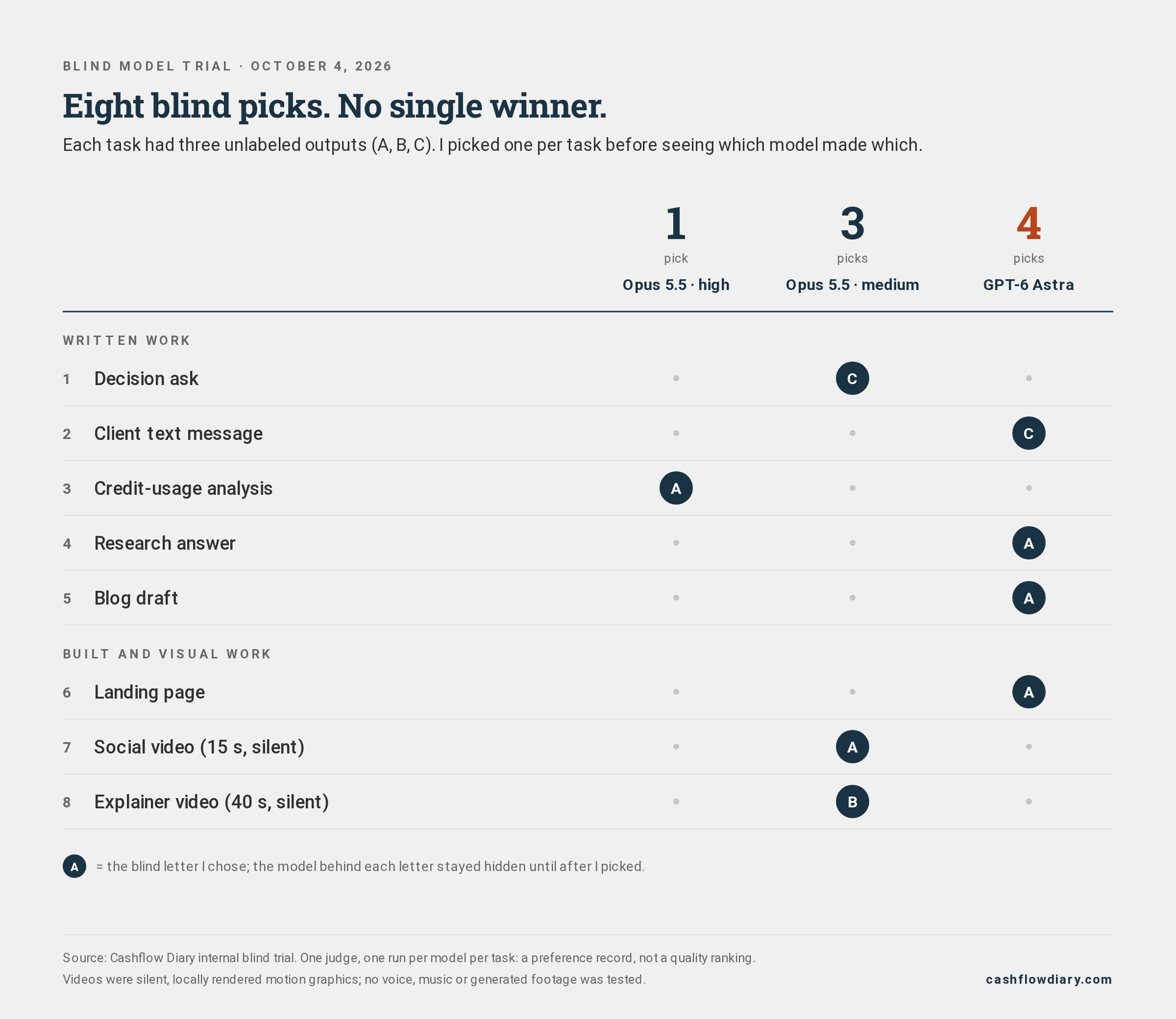
My first choices across eight tasks: Astra four, Smart three, Ultra one. One judge; one run per setting per task.
I recorded a favorite in each group. I didn't create a complete first-through-third ranking, and those picks don't tell us whether a runner-up was close.
The split gave me a practical starting point. I approved Astra as my default, retained Ultra for deep work, and chose Smart for video builds. Heavy, multi-source numerical analysis goes to Ultra.
Those are working choices for my setup. Your guest communication, reporting or website work may produce a different set of preferences.
Credits per job answer a different question
For the same eight-task bundle, Ultra consumed 9,655 credits, Astra consumed 8,074, and Smart consumed 4,023.2
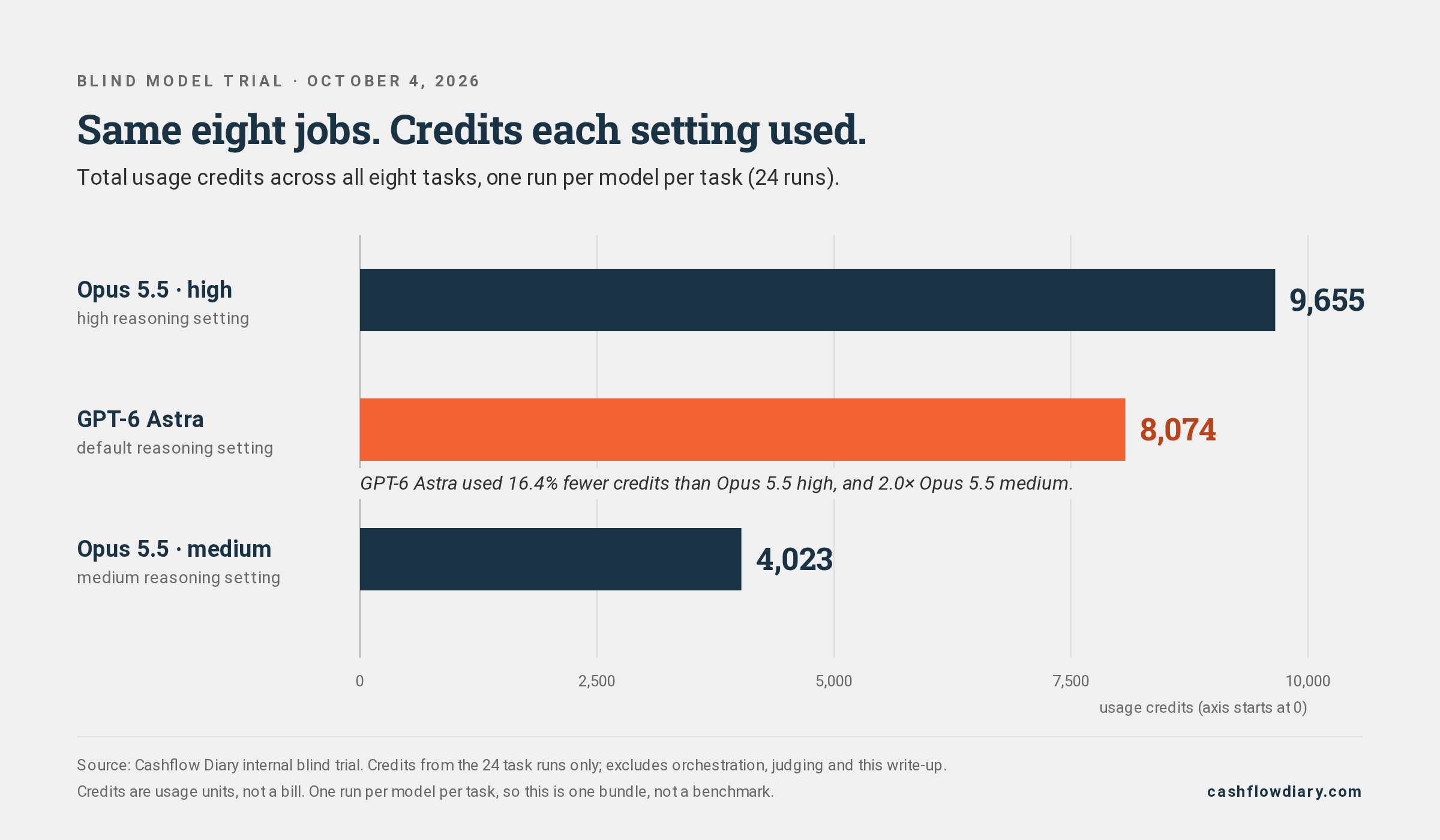
Credits for the eight-task bundle: Ultra 9,655; Astra 8,074; Smart 4,023. Task-thread usage only, excluding parent orchestration and judging.
Astra used about 16.4% fewer credits than Ultra, while consuming roughly twice Smart's credits.
The website I preferred came from Astra and used 2,518 credits. Ultra's website used 1,352; Smart's used 656.
My preferred website was the most credit-intensive of the three. The cheaper bundle didn't mean a cheaper result on every task.
Provider token rates price units of model input or output. A finished job may involve multiple model interactions and other work.
The recorded credits tell us what these task runs consumed inside Viktor. They aren't measured provider spending, a token count or a cash invoice.
This trial didn't measure token totals or tool-call counts. It can't explain the credit difference by saying one model “thought less” or “used fewer tools.”
⚡ Compare the recorded usage for the same job and the same acceptance standard. Keep your review time in a separate column.
For your own test, save both the preferred output and its usage. If you convert credits to dollars, label the plan rate and explain what the conversion represents.
A plan-rate allocation can help with budgeting. Calling it an extra charge would require evidence that the charge occurred.
Look at the work behind the choices
Some written outputs used private business details, so I'm sharing the website and video examples instead.
The website task was a single-page diagnostic-call landing page. It required a self-contained HTML file plus desktop and mobile screenshots.
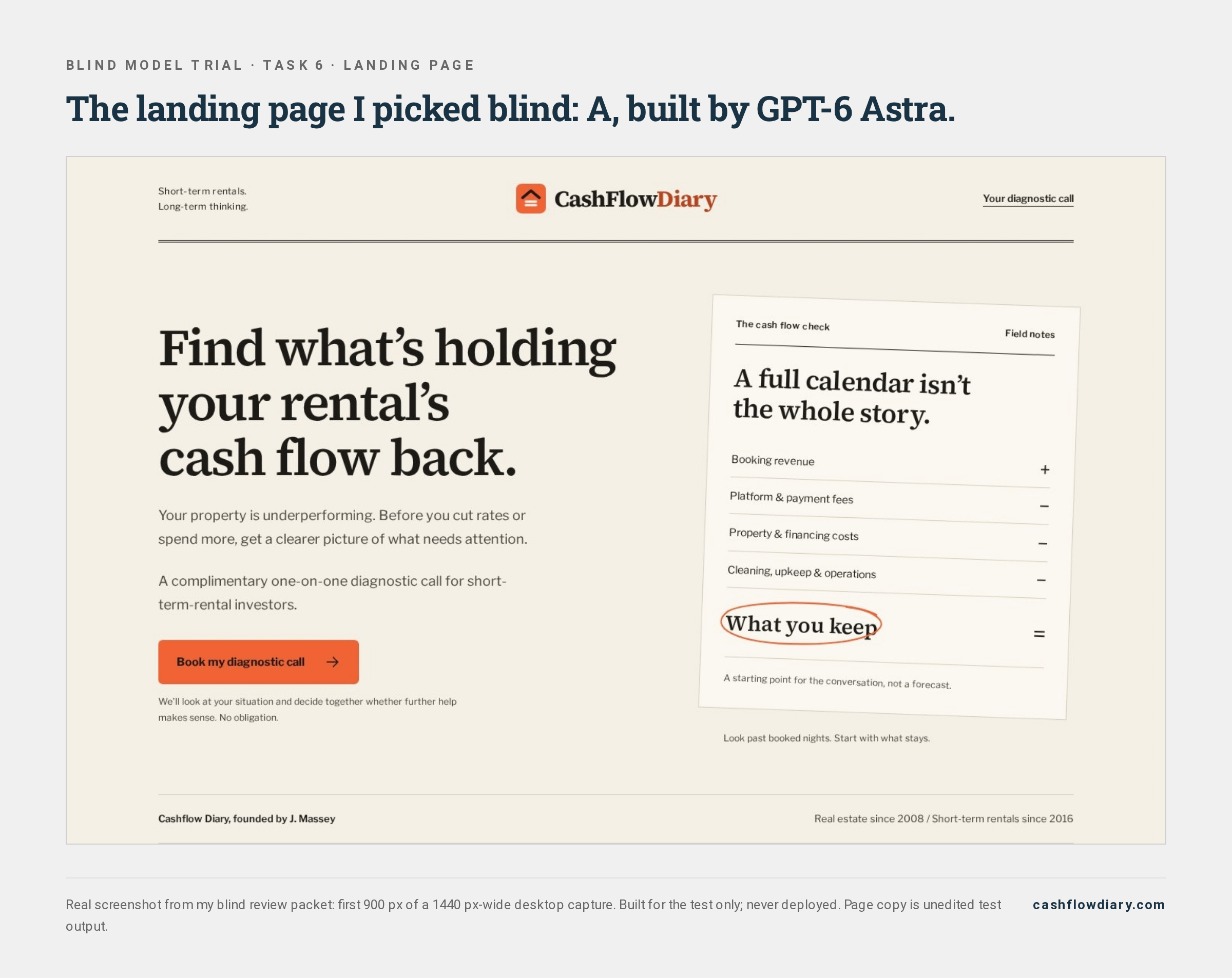
Selected trial screenshot (desktop crop); unedited test output. The live version includes booking and production fixes.
A screenshot lets you inspect the design I preferred. It cannot establish booking performance, and this test didn't measure conversion rates.
For a business website, you would still check the booking path, mobile layout and accuracy of every claim before using it.
The two video tasks were narrower than the word “video” might suggest.
One brief called for a 15-second vertical social piece. The other called for a 40-second horizontal explainer. Both used on-screen text and locally rendered motion graphics.
An excerpt from Smart's selected vertical social video. Silent, locally rendered motion graphics.
An excerpt from Smart's selected explainer. Silent, locally rendered motion graphics.
Smart was my first choice for both.
Audio was excluded. The trial tested no voices, music, actors or generated footage, so it can't tell you which setting would make the best narrated video.
The on-screen lending details are unedited test output, shown as design examples, not lending guidance.
I also can't offer a speed ranking. Runs shared computing resources, and video rendering involved a shared lock, waiting and rerendering.
In your own review, inspect the artifact your team would receive. Open the page on a phone. Watch the clip through its ending. Check the numbers in the report.
Run a small comparison you can repeat
You don't need eight tasks to begin. Choose a small set of recurring jobs with outputs you can inspect safely.
Choose the work and define “usable.” Pick a recurring task, then write its acceptance criteria before running it. For a guest message, that might mean accurate dates, appropriate tone and no unsupported promises. Remove private names and account details from test material.
Keep the brief and access consistent. Give each setting the same instructions, source material and tools. Save the model identifier and reasoning setting. A different brief or missing file can make the comparison difficult to interpret.
Hide identity and cost while judging. Have a helper shuffle the outputs into A, B and C. Keep the answer key separate. Write your preference and a short explanation before revealing the model. Allow “none is usable” as an answer.
Reveal usage and record the repair work. Compare task credits after choosing. Note factual errors, missing requirements and edits you would need. A favorite can still contain a serious mistake. Include failed attempts in the record.
Repeat before expanding the assignment. Try new examples of the same task, reshuffle the order and, where useful, ask another qualified person to judge. Recheck after a model or workflow changes.
💡 Give each task its own acceptance criteria before you compare models. A video preference cannot establish numerical accuracy.
You can start a worksheet with six fields: task, setting, pass or fail, blind preference, credits and required edits.
Keep safety separate from preference. If an answer invents a financial figure or exposes private information, mark that failure even if you like its presentation.
For recurring work, add frequency. A task you run every morning deserves different attention from a one-time page build.
Try the method on one recurring task
Write down what a usable result must get right, then judge the outputs before revealing settings or credits. Paid and founding readers also receive an editable scorecard and cost worksheet.
Related reading:
Your First Hire Isn't a Person

What we learned building an appointment-setting team in one day, and why it matters most before your first rental
Common questions about this test
Did Astra win overall?
It received four of my eight first choices. That describes my preferences in this trial. With one run per setting per task and one human judge, the result doesn't establish a general quality ranking.
Should I pick the lowest-credit setting?
Use your acceptance criteria first. Smart had the lowest bundle usage, but I preferred other settings for five jobs. Your decision also depends on the consequences of an error and the work required to repair it.
Will the same setting win next time?
That remains untested. Repeat runs could produce different outputs and choices. Save the briefs, settings and results so you can compare another round instead of relying on memory.
Choose a task to improve in your business
Start with a recurring job you currently have to correct. Write down what the finished work must get right before changing its model.
- J.
P.S. Keep your first test small enough that you can inspect every output yourself.
For educational purposes only. Results are not typical. Past performance does not guarantee future results.
Ready for the next step?
Source: Cashflow Diary's internal blind trial, October 4, 2026. Eight tasks, three settings and one task run per setting; J. Massey was the sole preference judge. This was a real-work agent trial with tools and rendering, not an isolated base-model benchmark.
Source: saved final usage records for the 24 task threads. Totals exclude parent orchestration, judging and production of this article. Percentages compare this fixed task bundle; credits are platform usage units.